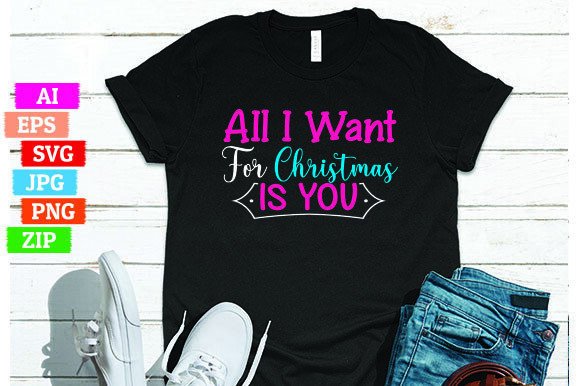
All I Want for Christmas is You: How to Use This Design for a Profitable Print on Demand Business
Some T-shirt designs capture a feeling so perfectly that they practically sell themselves. “All I Want for Christmas is You” is one of those designs. It taps into the holiday spirit, nostalgia, and a universally loved song. If you are running a Print on Demand (POD) business, this design can be a strong seller during the holiday season. But the difference between a design that flops and one that flies off the shelves often comes down to how you use the files you get.
When you purchase a design like this, you typically receive a ZIP folder containing an editable AI file, an SVG file, a PNG file, an EPS file, and a transparent PNG printable. That is a solid set of assets, but each format serves a different purpose. Using them incorrectly can lead to poor print quality, wasted time, and disappointed customers. Let's walk through the common mistakes people make with these files and how you can avoid them to build a more reliable and profitable POD business.
Understanding What You Actually Receive
Before you start uploading or editing, take a moment to understand what each file format in that ZIP folder is for. Many sellers open the PNG, see it looks fine on screen, and immediately upload it to their POD platform. That can work, but it often leads to disappointment when the print comes back blurry, pixelated, or with an unwanted background.
- The AI and EPS files are vector formats. They are resolution-independent, meaning you can scale them to any size without losing quality. Use these if you need to resize the design significantly or if you plan to edit individual elements in Adobe Illustrator or a similar program.
- The SVG file is also a vector format, widely supported in design tools like Cricut Design Space, Silhouette Studio, and even some online POD mockup generators. It is great for cutting machines or for importing into design software where you need scalability.
- The PNG file is a raster image. It can be high quality, but it has a fixed resolution. The transparent PNG is useful for quick mockups or for POD platforms that accept PNGs directly, but you must check the resolution and DPI.
- The transparent PNG printable is essentially the same as the regular PNG but optimized for printing. Still, it is a raster file, so scaling it up beyond its original size will degrade quality.
A common misunderstanding is thinking all these files are interchangeable. They are not. Choosing the wrong one for your workflow can cause unnecessary headaches. If you plan to print on a large shirt size, using a small PNG will result in a fuzzy design. Always use a vector file (AI, SVG, or EPS) when scaling is involved.
Mistake #1: Ignoring the ZIP Folder Structure
When you download the ZIP folder, do not just double-click and open the first file you see. Extract the entire folder to a dedicated location on your computer. Working directly inside a compressed folder can cause file corruption, missing assets, or software errors. Take the extra thirty seconds to unzip the folder properly. This small habit will save you from troubleshooting broken files later.
Once extracted, organize the files by naming them clearly and keeping them in a logical folder structure. For example, you could create a main folder named “Christmas Designs” and subfolders for each format. This makes it easy to find the right file when you are in the middle of production.
Mistake #2: Using the Wrong File Format for Your POD Platform
Different POD platforms have different requirements. Some accept SVG files directly, others prefer PNGs with transparent backgrounds, and a few allow EPS uploads. Before you upload, check the platform's guidelines. Many sellers assume PNG is always the safest choice, but that is not always true.
- If your platform accepts SVG, use it. It ensures the design remains crisp at any size and allows the platform to process the print more accurately.
- If the platform requires PNG, make sure you use the transparent PNG and that it is at least 300 DPI at the print size you intend. For example, if you want to print the design at 12 inches wide, the PNG should be at least 3600 pixels wide.
- If you are editing the design, always start with the AI or EPS file. Make your changes there, then export a high-resolution PNG or SVG for upload. Editing a PNG directly will degrade quality.
A realistic example: You upload a 150 DPI PNG that looks great on your monitor. The customer orders a 3XL shirt. When the print is produced, it comes out blurry and soft. That customer is unlikely to order from you again. Avoid this by using vector files whenever possible, or by confirming your PNGs meet the required resolution for the largest size you plan to offer.
Mistake #3: Overlooking the Editable AI File for Customization
One of the biggest advantages of receiving an editable AI file is the ability to customize the design. Maybe you want to change the color of the text to match your brand, adjust the size of the graphic, or add your own holiday elements. If you skip the AI file and work directly with the PNG, you lose that flexibility.
For example, imagine you want to offer “All I Want for Christmas is You” in a silver metallic print on a black shirt. With the AI file, you can easily change the text color to silver, add a subtle glitter effect, and export a PNG with the exact look you want. Without the AI file, you are stuck with whatever colors the original designer chose.
If you do not have Adobe Illustrator, free alternatives like Inkscape can open SVG files and allow similar edits. The AI file can also be imported into other vector editing tools. Do not let the format intimidate you. Learning the basics of vector editing will make your designs more versatile and increase your profit margins.
Mistake #4: Neglecting Print Placement and Size Adjustments
A design that looks balanced on a mockup might not translate well to a physical shirt. One common oversight is failing to adjust the size and placement for different shirt sizes. The same design that looks proportional on a medium shirt may look too small on a 4XL or too large on an extra small.
Use the AI or SVG file to create size variants. Many POD platforms allow you to upload multiple size-specific files or to set a percentage scaling for each size range. If your platform does not, create a single vector file at a generous size that works across a range of shirt sizes without looking awkward. Test your design on multiple mockup sizes before publishing.
Also, consider placement. The standard center chest print works well, but you might offer a left chest version, a full back print, or a sleeve design. Each placement may require a slightly different file. The editable AI file makes it simple to reposition the graphic without losing quality.
Mistake #5: Forgetting to Check Licensing and Usage Rights
This is a critical but often overlooked step. Just because you purchased the design files does not mean you have unlimited rights to use them. Some designers sell commercial licenses that allow you to sell printed products, while others restrict usage to personal projects only. Read the license agreement carefully before you start selling.
If you are using “All I Want for Christmas is You” in a commercial POD store, you almost certainly need a license that explicitly permits commercial use. If the design includes song lyrics or copyrighted phrases, there may be additional legal considerations. The “All I Want for Christmas is You” phrase is a well-known song title, and while song titles themselves are not typically copyrighted, using lyrics from the song could be. Ensure your design is either original enough to avoid infringement or properly licensed.
When in doubt, contact the designer or the marketplace where you purchased the files. A quick email can save you from a legal headache down the road.
Mistake #6: Ignoring Print Quality and Mockups
Your design could be perfect, but if the print quality is poor, the customer will blame you. Before you launch a new design, order a sample. See how the design looks on the actual shirt fabric. Check for color accuracy, sharpness, and durability after washing. This is not an optional step if you care about your reputation.
Many POD sellers skip sampling to save money, but one batch of poorly printed shirts can damage your store's reviews for months. Consider sampling on the shirt color and size you expect to sell most. If the design includes fine text or thin lines, check that those details print clearly. Vector files generally print more cleanly than raster files, so if you are having quality issues, switch to the SVG or AI file for your print upload.
Practical Advice for Better Results
Here are a few straightforward steps that will improve your outcomes without adding much time to your workflow:
- Always start with the vector file (AI, SVG, or EPS) for any editing or scaling. Only use the PNG for quick mockups or for platforms that require it.
- Name your files clearly and include the format and intended use in the filename, like “AllIW antForChristmas_SVG_white_12x12.” This keeps your assets organized.
- Test on multiple devices. What looks good on your monitor may look different on a phone or tablet. Check your mockups on several screens to ensure contrast and readability hold up.
- Consider offering variations. Use the editable AI file to create a distressed version, a glitter version, or a version with a different font. This can help you target different customer tastes without buying new designs.
- Backup your files. Store the ZIP folder and extracted files in at least two locations (cloud and local drive). Losing your design files means losing weeks of work.
What to Check Before You Buy a Design Like This
Before you purchase “All I Want for Christmas is You” or any similar T-shirt design for your POD business, ask these questions:
- Does the file package include vector formats (AI, EPS, or SVG)? If not, you will be limited in how you can use and scale the design.
- Is the design resolution high enough for large prints? Check the pixel dimensions of the PNG. At least 300 DPI at your intended print size is the minimum.
- Does the license allow commercial use? Do not assume. Read the terms.
- Can the designer provide support if you have trouble editing the files? Some designers offer basic support, which can be helpful if you are new to vector editing.
- Is the design unique enough to stand out? During the holiday season, thousands of sellers use similar phrases. A slightly different font, color palette, or graphic element can make yours distinctive.
By being thorough on the front end, you avoid surprises that could cost you time and money later. The files you receive—AI, SVG, PNG, EPS, and transparent PNG—are tools. How you use them determines whether your T-shirt design becomes a profitable product or a missed opportunity. Take the time to understand each format, plan your sizes and placements, test your prints, and respect the license. With the right approach, “All I Want for Christmas is You” can be a bright spot in your holiday sales.