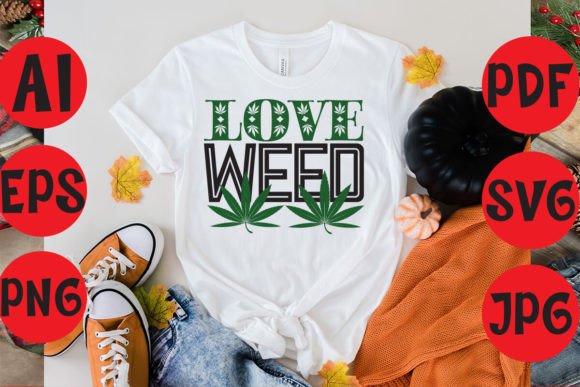
Love Weed: Merging Typography and Nature into T-Shirt Design Workflows
Digital design bundles have reshaped how creatives approach everything from small-batch apparel to home décor. Among the most versatile offerings is the Love Weed collection, a set of weed typography assets that bring together botanical motifs, romantic messaging, and bold lettering. Whether you run a print-on-demand store, craft for weekend markets, or simply enjoy personalizing gifts, understanding how to integrate these files into your existing process can save time, reduce waste, and improve the consistency of your final output.
This article walks through practical ways to use the Love Weed bundle—from selecting the right file format for your equipment to scaling your designs for different products. The focus is on real workflow decisions: preparation, tool compatibility, organization, and quality control. No filler, no hype—just actionable steps for incorporating these SVG, EPS, DXF, PNG, and PDF files into your creative or small-business routine.
What the Love Weed Bundle Delivers
Before diving into process, it helps to know exactly what you get. The bundle includes four ZIP archives containing digital cut files in SVG, EPS, DXF, and PNG formats. You also receive a PDF for reference or print-on-demand mockups. The designs center on “Love Weed” and weed typography, making them suitable for Valentine’s Day projects, casual apparel, and lifestyle branding where botanical imagery meets romantic or playful text.
The bundle’s strength lies in its format variety. Each file type serves a specific purpose in a standard design workflow:
- SVG (Scalable Vector Graphics) – Ideal for cutting machines like Cricut or Silhouette, and for resizing without loss of quality.
- EPS (Encapsulated PostScript) – Great for professional vector editing in Adobe Illustrator or CorelDRAW.
- DXF (Drawing Exchange Format) – Often used for CNC routing or advanced cutting software.
- PNG (Portable Network Graphics) – A raster format with transparent background, perfect for print-on-demand platforms or digital mockups.
- PDF (Portable Document Format) – Useful for printing on paper or cardstock, or as a universal reference file.
Because you receive all five, you can move between design editing, cutting, printing, and final production without converting files each time. This reduces friction and keeps your creative flow uninterrupted.
Setting Up Your Digital Workspace
The first step is to unzip each folder and label them by format. A simple naming convention—such as LoveWeed_SVG, LoveWeed_EPS, etc.—helps you find the correct file quickly when you’re mid-project. If you work across multiple devices or share assets with a team, store the files in a cloud folder (e.g., Google Drive or Dropbox) with the same structure. This preparation pays off when you need to grab a PNG for a mockup while someone else cuts the SVG on another machine.
Another preparation tip: check the software you plan to use. For example, Cricut Design Space works best with SVG files, but it also accepts DXF. Silhouette Studio prefers SVG or DXF. If you use Adobe Illustrator, EPS or SVG are both fine. Knowing your primary tool’s preferred format will let you prioritize which ZIP to open first.
Checking File Integrity
Before any production run, open a few files to confirm they load correctly. This is especially important for SVG and DXF, as some cutting programs can misinterpret complex layers. Look for ungrouped elements, missing paths, or stray nodes. If you find issues, many vector editors allow quick cleanup. Taking five minutes at the start saves you from wasted vinyl or misaligned prints later.
Customizing for Different Products
One bundle can serve many surfaces—from t-shirts to tumblers to wall art. The trick is adapting the artwork without losing its character. For example, a Love Weed design that works at 10 inches wide on a tee might need to be 4 inches for a mug. Because SVG and EPS are vector formats, you can scale them proportionally without pixelation. In your editing software, group all elements, then adjust the width while locking the aspect ratio. Keep a master copy of the original size; save scaled versions with names like LoveWeed_Tee_10in.svg.
Typography is often the centerpiece of these designs. If you want to replace the text (maybe change “Love Weed” to a custom phrase), edit the SVG in Illustrator or Inkscape. The vector text layers are usually editable outlines, but if they appear as paths, you can use the type tool to re-create the lettering with a similar font. This flexibility lets you personalize gifts or adjust the message for different holidays.
Working with Colors and Layers
The Love Weed bundle likely uses multiple layers for the leaf imagery and the text. When preparing a design for heat transfer vinyl (HTV), you may need to separate layers by color if your machine cuts one color at a time. Open the SVG in your cutting software, inspect the layer panel, and assign each color to a separate cut mat. For instance, the green leaves go on one mat, the black text on another, and you press them sequentially. This layered approach is common for t-shirt designs with weed typography.
For print-and-cut (e.g., printable HTV or sticker paper), you can merge all layers into a single PNG with a transparent background, then print the full-color design before cutting the outline. The included PNG files are ideal for this: just drop them into your design space, adjust the size, and send to print. No vector editing required.
T-Shirts and Apparel
Apparel is the most obvious use case, and the Love Weed theme fits Valentine’s Day promotions, casual streetwear, or botanical lifestyle brands. The workflow for a heat press:
- Load the SVG into Cricut Design Space (or your preferred software).
- Mirror the design if using HTV (always mirror for iron-on on dark fabrics).
- Cut the vinyl, weed the excess, and transfer the design using a heat press or household iron.
- For multi-color designs, repeat the process for each color layer, aligning using a guide or registration marks.
If you run a print-on-demand service like Printful or Teespring, you can upload the PNG directly to their mockup generator. The transparent background saves steps—no need to remove a white box. The high resolution ensures good print quality even for large sizes.
Home Décor and Tumblers
The same files work on wood signs, canvas, or stainless steel tumblers. For tumblers, use permanent vinyl (SVG cut) or printable adhesive paper (PNG print-and-cut). The key is adjusting the design shape—for a cylindrical surface, keep the artwork narrow so it wraps cleanly without distortion. Test with a paper cutout before committing to vinyl. The PDF in the bundle can serve as a reference for scale.
For wall art, consider using the EPS file in a large-format printer. Or cut the design from adhesive vinyl and apply to a painted wooden board. The botanical elements of Love Weed look particularly good on distressed or natural wood backgrounds.
Stationery and Party Items
For cards, invites, or gift tags, the PNG files are your quickest option. Drop them into a document template (Canva, Word, or Publisher), resize, and print. The weed typography adds a modern, playful edge to Valentine’s cards or party decorations. Because the bundle includes PDF, you can also print directly and cut by hand or with a guillotine.
Checking Cutting and Pressing Results
After your first run, inspect the finished product. Did the vinyl adhere fully? Are there any lifted edges around the typography? Small, intricate letters (like the ones in weed typography) sometimes require a lower cut pressure or a slower press time. Keep notes: for that particular SVG, you might note that the CTT (Cut Time Tolerance) needs to be 1.2× default for thin stems. Over time, you build a reference library for each design in the Love Weed bundle, which speeds up production reruns.
Storing and Reusing Files
Because you own the bundle forever, you can reuse it year after year. Create a master folder named LoveWeed_Bundle and inside it, subfolders for Editable_Sources (the original SVG/EPS), Production_Ready (scaled/colored versions for each product), and Mockups (PNGs and PDFs for listings). This organization makes it easy to revisit the designs for a new Valentine’s Day season or a different product line without starting from scratch.
Scaling the Love Weed Workflow for Business
If you’re selling finished products—whether at craft fairs or online—consistency matters. The bundle’s file formats allow you to:
- Outsource cutting to a production partner by sending them the DXF or EPS files.
- Create multiple colorways of the same design (green text, pink text, etc.) without redrawing.
- Test new products by resizing the SVG for different blanks without manual tracing.
For example, if you see that a particular “Love Weed” t-shirt design performs well, you can quickly produce matching stickers, mugs, and totes using the same source file. This streamlines inventory management and reinforces brand identity.
Marketing the designs also gets easier when you have PNGs with transparent backgrounds. You can layer them onto lifestyle photos, create social posts, or add them to mockup templates. The PDF is handy for printable lookbooks or catalog pages. No need to request separate art from a designer—the bundle acts as your in-house asset library.
Observations on Workflow Integration
From experience, the most common pitfall with bundles like Love Weed is not taking advantage of all the formats. Many people default to SVG because it’s popular, but the EPS file might carry additional metadata or be better suited for professional print houses. Similarly, while PNG is great for mockups, it’s not ideal for cutting—so keep the vector files for production.
Another observation: because the bundle focuses on typography, consider the readability at smaller sizes. Test the designed text at 3 inches wide on a tumbler mockup before cutting vinyl for 20 cups. If the lettering becomes too thin, enlarge the design or simplify the font by merging overlapping paths. The vector editors allow this without losing the original file.
Finally, think about the emotional resonance of the Love Weed theme. It combines love-centric messaging with natural elements, which appeals to a wide audience from couples to plant lovers. If you’re building a seasonal collection (Valentine’s Day, anniversaries, or even cannabis-themed events), this bundle gives you a cohesive visual language. By planning your product lineup around a single asset source, you reduce design time and maintain a clean aesthetic across items.
Long-Term Use and Iteration
The beauty of a digital bundle is that it can evolve with your skills. As you become more comfortable with vector editing, you can remix the Love Weed designs—add your own tagline, combine with other floral elements, or change the color palette to match a brand. The original EPS and SVG files serve as base templates that you can modify without starting from a blank canvas.
For productivity-minded users, creating a simple style guide for each design (dimensions, color codes, cutting parameters) turns the bundle into a repeatable system. This is especially useful if you collaborate with a team or plan to offer the same design on multiple platforms. Instead of re-measuring each time, you refer to your guide. Over years, the Love Weed bundle becomes a cornerstone of your product catalog rather than a one-off purchase.
To sum up: the Love Weed typography t-shirt design bundle is more than a set of pretty files. When integrated thoughtfully—with proper preparation, format selection, and quality checks—it becomes a workflow accelerator. Whether you’re pressing a single shirt for a friend or scaling to a full apparel line, the combination of SVG, EPS, DXF, PNG, and PDF gives you the flexibility to move from idea to product with minimal friction. Focus on the process, keep your assets organized, and let the designs do the work.