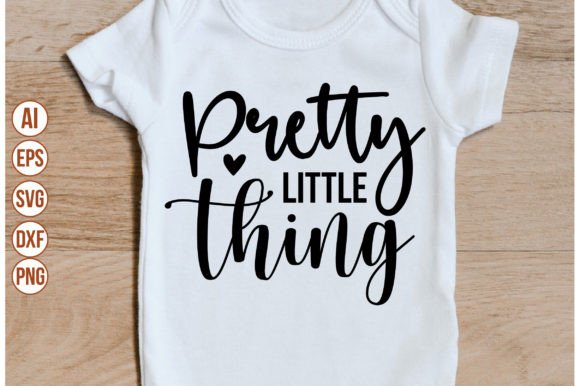
Pretty Little Thing Digital Design Bundle: What You Get and How to Use It
Digital crafting has transformed how we approach creative projects. Whether you are designing custom apparel, scrapbooking, or building a small business around personalized products, having the right file formats is critical. The Pretty Little Thing digital download bundle offers a complete set of vector and raster files designed for maximum compatibility across cutting machines, graphic design software, and print-on-demand platforms. This article walks through exactly what comes in the package, how each file type serves a specific purpose, and how you can integrate these assets into your workflow from day one.
What Exactly Is Included in the Download
When you purchase the Pretty Little Thing digital download, you receive a single .zip archive containing five individual files. Each file serves a different function depending on the tool or machine you use. Here is the complete breakdown:
- 1 SVG File – Scalable Vector Graphic. Ideal for Cricut, Silhouette, and other cutting machines that rely on vector paths. SVG files scale infinitely without losing quality.
- 1 PNG File – Portable Network Graphic. A high-resolution raster image with a transparent background. Perfect for print-on-demand mockups, digital planners, or as a base for further editing in Photoshop.
- 1 EPS File – Encapsulated PostScript. A professional-grade vector format widely used in Adobe Illustrator and Inkscape. EPS files preserve layers, strokes, and fill properties for advanced editing.
- 1 DXF File – Drawing Exchange Format. A vector format originally developed for CAD software but now commonly used in Silhouette Studio and other cutting programs that prefer DXF over SVG for certain operations.
- 1 JPEG File – Joint Photographic Experts Group. A standard raster image without transparency. Useful for quick previews, social media sharing, or printing on paper-based materials where transparency is not needed.
This combination of formats ensures you can use the Pretty Little Thing design regardless of your preferred tool or operating system. No more hunting for file converters or worrying about compatibility issues.
Which Machines and Software Are Compatible
The bundle is designed to work out of the box with the most popular crafting and design platforms. Here is how each file maps to common environments:
Cricut Design Space
Upload the SVG file directly into Cricut Design Space. The vector paths will remain clean and editable. You can resize the design without pixelation, change colors by layer, and adjust cut lines as needed. The PNG file also works as a print-then-cut image if you prefer a raster approach. Many crafters find the SVG option faster because it eliminates the need to clean up background removal.
Silhouette Studio
Both the SVG and DXF files are compatible with Silhouette Studio. Some users report that DXF imports more reliably for complex designs, especially when using the basic edition of the software. The EPS file can also be imported if you have the upgraded Designer Edition. Test all three vector formats to see which gives you the cleanest results for your specific design.
Adobe Photoshop and Adobe Illustrator
For professional designers, the EPS file is the gold standard. It opens in Adobe Illustrator with editable vector paths, anchored points, and scalable dimensions. In Adobe Photoshop, the PNG file with a transparent background layers seamlessly over other images, photographs, or backgrounds. The JPEG file works as a quick reference layer or for sharing drafts with clients.
Inkscape
Inkscape users will appreciate the SVG and EPS support. Inkscape handles SVG natively, but EPS imports require a minor conversion step (Inkscape typically converts EPS to PDF on import). Either way, you retain full vector editing capability without any subscription cost.
This cross-platform compatibility means you are not locked into one ecosystem. Whether you are a hobbyist with a single Cricut machine or a professional designer running multiple Adobe subscriptions, the Pretty Little Thing bundle fits your existing workflow.
Practical Applications for Modern Crafting and Design
Digital downloads like this one are not just about having a file sitting on your hard drive. They are about what you can make with them. Here are several real-world scenarios where these files shine:
T-Shirt and Apparel Decoration
Use the SVG file to cut heat-transfer vinyl (HTV) with your Cricut or Silhouette. Weed the design, press it onto a t-shirt, tote bag, or hoodie, and you have a finished product in under thirty minutes. The vector format ensures crisp lines even on larger sizes. If you are running a small print-on-demand business, the PNG file works great for uploading to platforms like Printful or Printify, where a transparent background is required.
Home Décor and Signage
Cut adhesive vinyl for wall decals, wooden signs, or glass etching. The DXF file is particularly helpful if you use a scanner or larger format cutting machine. You can also use the EPS file to send to a laser engraver or CNC router if you want to create permanent signage on wood or acrylic.
Paper Crafts and Scrapbooking
Print the JPEG or PNG file onto cardstock, then cut around the edges by hand or with a trimmer. For die-cutting machines, the SVG file lets you cut intricate paper shapes for greeting cards, party decorations, or journaling layouts. The transparent PNG also works well in digital scrapbooking software like Canva or Affinity Photo.
Digital Products and Etsy Listings
If you sell digital products yourself, the Pretty Little Thing design can be used as a base for creating your own bundles. Modify the colors, combine it with other elements, and repackage it as a new listing. Just be mindful of the original license terms if the purchase is for personal use only.
Important Qualities to Consider Before Downloading
Before you purchase any digital design bundle, there are a few characteristics worth examining. These directly affect how useful the files will be in your specific projects:
File Quality and Resolution
The PNG file in this bundle comes with a transparent background, which eliminates the need for manual background removal. Check the dimensions of the PNG to ensure it meets your resolution needs. For print projects, you typically want at least 300 DPI. For digital use, 72–150 DPI is usually sufficient. The SVG and EPS files are resolution-independent, so they can be scaled to any size without degradation.
Layer Organization
One often overlooked aspect is how well the vector files are organized. A well-structured SVG or EPS file will have clearly named layers, grouped elements, and minimal overlapping paths. This makes editing easier when you want to change colors or remove parts of the design. The Pretty Little Thing bundle is built with clean layer organization in mind, but you should always open the file in a viewer before starting a critical project.
Licensing and Usage Rights
Digital downloads typically come with specific usage terms. Some allow unlimited personal and commercial use, while others restrict the number of sales or require attribution. Before using the design on products you intend to sell, verify the license included with your purchase. If the terms are unclear, contact the seller directly.
Why This Bundle Fits Into Modern Workflows
The shift toward digital crafting has created a need for versatile, ready-to-use assets. No one wants to spend hours converting file formats or cleaning up poor-quality vectors. The Pretty Little Thing digital download addresses this by giving you five formats in one archive. You can move from purchase to production in minutes.
Consider the typical workflow for a small business owner who designs custom tumblers. They need a design that works in their cutting machine for vinyl application, looks good in product photos (PNG or JPEG), and can be edited later if they want to offer color variations (SVG or EPS). Having all five formats means they never have to stop and troubleshoot compatibility. They just open the right file for the task at hand.
For educators and content creators, the bundle also simplifies tutorial creation. You can use the EPS file to demonstrate vector editing techniques in Illustrator, then switch to the PNG file to show raster masking in Photoshop. The variety of formats supports a wide range of instructional scenarios.
Common Considerations Before Adopting Digital Design Files
If you are new to digital crafting or design software, here are a few practical tips to keep in mind when working with bundles like this:
- Check your software version. Older versions of Silhouette Studio or Cricut Design Space may not support the latest SVG specifications. If you encounter import errors, try the DXF or EPS alternatives.
- Keep your .zip file organized. After downloading, extract the contents to a dedicated folder. Name the folder clearly so you can find the design weeks or months later.
- Test a small cut first. Before committing to a large sheet of expensive vinyl or HTV, do a test cut on scrap material. This verifies that the file imports correctly and that your machine settings are dialed in.
- Back up your files. Digital downloads can sometimes expire or be removed from the shop. Store your .zip archive in cloud storage or an external drive for long-term access.
- Understand your machine's import quirks. For example, Cricut Design Space may flatten certain SVG attributes like stroke width or dash patterns. Silhouette Studio sometimes interprets DXF dimensions differently than SVG. Being aware of these quirks saves frustration.
Final Observations on the Pretty Little Thing Digital Bundle
The Pretty Little Thing digital download bundle demonstrates how a well-prepared set of files can remove barriers between inspiration and creation. By including SVG, PNG, EPS, DXF, and JPEG formats, it covers virtually every use case a crafter, designer, or small business owner might encounter. You are not just buying a design—you are buying compatibility, flexibility, and time saved. Whether you are cutting vinyl for a weekend market booth, designing digital products for Etsy, or simply adding a decorative touch to your home, having these five formats at your fingertips ensures you can proceed without friction. The only remaining step is deciding what to make first.