Santa Claus Cartoon ClipArt 1 Bundle for Designers
Holiday design projects demand assets that feel both festive and flexible. Rushed or generic clipart can undermine an otherwise polished layout, while thoughtfully crafted vector illustrations elevate everything from social media posts to product packaging. Santa Claus Cartoon ClipArt 1 delivers exactly that kind of versatility. This flat digital vector graphic bundle offers four distinct Santa illustrations in multiple file formats, making it a practical addition to any creative professional's toolkit. Whether you are preparing seasonal marketing materials, designing a holiday-themed website, or creating craft projects for clients, understanding what this bundle contains and how to use it effectively can save you time and deliver better results.
What Is Inside the Santa Claus Cartoon ClipArt 1 Set
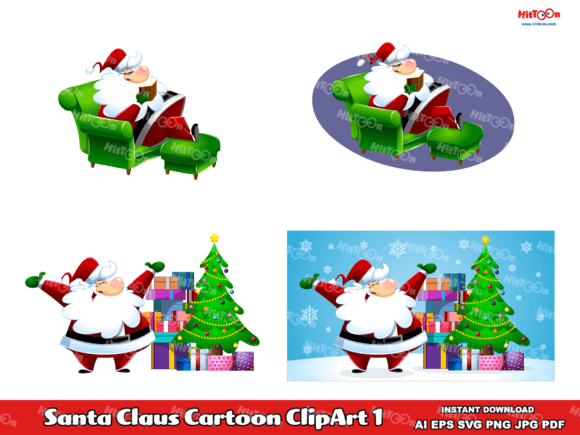
This bundle includes four unique Santa Claus cartoon illustrations, each rendered in a flat vector style. The visual approach prioritizes clean shapes, bold outlines, and simplified details that work well across both digital and print applications. The Santas vary in pose and expression, giving you options for hero images, accent graphics, or patterned backgrounds. Because the files are fully vector-based, you can scale each illustration to any size without losing crispness or introducing pixelation.
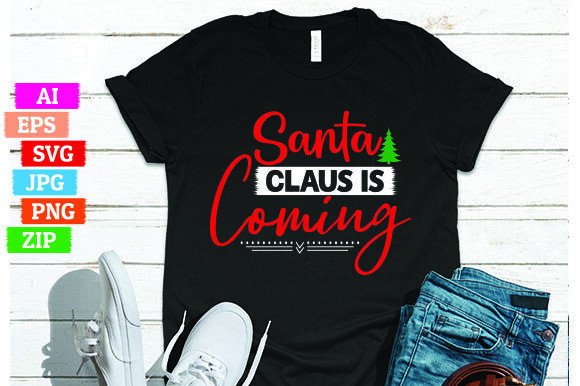
The ZIP archive contains:
- AI file – native Adobe Illustrator format for full layer editing
- EPS file – universal vector format compatible with most design software
- SVG file – scalable web-ready vector format for responsive design
- JPG file – high-resolution raster preview for quick reference
- 4 PNG files – individual illustrations with transparent backgrounds
The inclusion of transparent PNG files is especially practical for non-designers who need to drop Santa into presentations, social media graphics, or email headers without wrestling with software. For designers working in Illustrator or Affinity, the AI and EPS files allow you to recolor, resize, or combine elements with other design assets in your library.
Visual Characteristics and Style Appeal
The illustrations in Santa Claus Cartoon ClipArt 1 follow a flat digital vector aesthetic. There are no gradients, shadows, or textured overlays. Instead, the style relies on confident line work and solid color blocks. This approach has several advantages for modern design. Flat vectors reproduce reliably across different media, from cheap uncoated paper to high-end retail packaging. They also scale down to small sizes (think favicon or sticker) without becoming muddy or losing legibility.
The Santas feature classic holiday iconography: red suits, white trim, black belts, and rosy cheeks. But the poses and facial expressions add personality. You will find a waving Santa, a gift-carrying Santa, a Santa caught mid-laugh, and a Santa holding a candy cane. This range lets you match the tone of your project. A cheerful, waving Santa works for a welcome banner on a children's toy website, while the more subdued candy cane illustration might suit a holiday card for an older demographic.
Color palettes stick to traditional red, white, black, and skin tones, with minimal accents. This restraint makes the set easy to incorporate into existing brand color systems. If your brand uses a particular shade of red for logos or headers, you can adjust the illustration colors in the vector files to align perfectly with your brand identity.
Where Santa Claus Cartoon ClipArt 1 Performs Best
Understanding where these illustrations shine helps you make strategic decisions during project planning. The flat style is especially effective in contexts where clarity and speed matter. Consider these applications:
Digital Marketing and Social Media
Social media feeds are crowded during the holiday season. Flat vector graphics stand out because they read quickly. A Santa illustration used as a Facebook post background or Instagram Story element grabs attention without requiring the viewer to parse complex visuals. The transparent PNGs let you layer Santa over branded backgrounds, photos, or gradients with a few clicks. For email marketing, the SVG format allows responsive scaling, so your December newsletter header looks sharp on both desktop and mobile screens.
Web and Editorial Design
If web design is part of your workflow, the SVG file is your best friend. SVGs are lightweight, scalable, and maintain sharpness on retina displays. You can use a single Santa illustration as a decorative element on a landing page, or rotate between the four poses across multiple pages to create visual variety. For editorial projects like holiday magazines, newsletters, or digital catalogs, the EPS format integrates smoothly with layout software such as InDesign and QuarkXPress.
Packaging and Print Collateral
Entrepreneurs and small business owners producing seasonal packaging will appreciate the vector flexibility. A gift tag, product label, or box insert featuring a flat Santa illustration communicates holiday cheer without overwhelming the product itself. Because the files are editable, you can reduce opacity, adjust colors, or combine Santa with other graphic elements to achieve a custom look. The JPG files serve as quick previews for clients or print vendors, while the vector formats ensure professional-grade output at any size.
Crafting and Hobby Projects
Hobbyists and crafters often work with print-on-demand platforms or home cutting machines. The SVG files are directly importable into Cricut Design Space, Silhouette Studio, and similar software. You can use the Santas to create custom T-shirt designs, tote bags, mugs, ornaments, or holiday decorations. The transparent PNG files also work well for digital planners, sticker sheets, and scrapbooking layouts.
How These Illustrations Influence Design Perception and Engagement
Every visual asset you include in a project carries subtext. Flat vector illustrations like those in Santa Claus Cartoon ClipArt 1 signal a few things to your audience. First, they communicate confidence and restraint. A flat illustration says the designer chose simplicity over flash, which can build trust with viewers who value clarity. Second, the uniformity of style across the four poses creates visual consistency. Consistent illustration style is a hallmark of professional brand identity, whether you are designing for a single campaign or an entire season.
From a readability standpoint, these vectors support visual hierarchy effectively. Because they are not overly detailed, they work well as supporting elements that guide the eye toward primary content like headlines, calls to action, or product images. This matters in logo design or hero sections where the illustration must complement rather than compete with typography.
Audience engagement also benefits from the recognizable, friendly subject matter. Santa Claus carries cultural significance that triggers immediate emotional recognition. Pairing that recognition with clean, modern vector styling appeals to both traditionalists and contemporary design sensibilities. Marketers publishing social media graphics often see higher click-through rates when using clear, friendly imagery because viewers process the content faster and feel more inclined to interact.
Practical Guidance for Choosing and Using This Bundle
Selecting the right creative font or design asset for a project involves more than personal preference. Consider these factors when deciding whether Santa Claus Cartoon ClipArt 1 fits your next job:
Project Fit and Brand Alignment
Start by evaluating the overall tone of your project. Is it playful, professional, or somewhere in between? These Santas lean toward friendly and approachable. They are not overly cartoonish or childish, which makes them suitable for editorial design aimed at adults. However, if your brand voice is very minimalist or modern, you may want to use only one illustration as an accent rather than featuring Santas prominently. Test the illustrations against your brand colors and typography early in the process to confirm alignment.
Font Pairing Considerations
Illustrations and modern typography should complement each other. Flat vector graphics pair well with clean sans serif fonts that echo the simplicity of the line work. Consider using a bold sans serif font for headlines and a neutral serif or sans for body text. Avoid overly ornate or script fonts that might clash with the flat aesthetic. A good pairing test: place a headline and the Santa illustration side by side. If neither overwhelms the other, you have a strong combination. For digital ads, pairing these illustrations with a handwritten font can add warmth without sacrificing clarity.
Licensing and Commercial Use
This bundle comes with commercial use rights, which means you can incorporate the illustrations into client projects, merchandise, and marketing materials. Always confirm the specific terms in the license file included in your download. For entrepreneurs selling products like holiday cards, mugs, or apparel, commercial licensing removes the guesswork and legal risk. Keep a copy of the license with your project files for reference.
File Format Workflow
Build a workflow that matches your tools. If you use Adobe Illustrator, start with the AI file. For web projects, use the SVG file directly. If you work in Canva or similar browser-based tools, the transparent PNGs are your quickest path. The EPS file serves as a reliable fallback if you switch between software packages. Maintaining a consistent folder structure for each format saves time during busy seasons.
Testing Readability and Scale
Before finalizing a design, test the illustration at the size it will actually appear. A Santa that looks great on a 27-inch monitor might feel small and lost on a mobile screen. The flat style and bold outlines in this set help maintain clarity at smaller sizes, but you should still preview your layout at realistic dimensions. For print, use the vector formats to avoid resolution issues. For digital, the SVG format ensures the illustration stays crisp across devices.
Real-World Design Observations
Flat vector illustration bundles like Santa Claus Cartoon ClipArt 1 have become popular for good reason. In my own work designing seasonal email campaigns for e-commerce clients, I have found that flat vectors outperform more detailed illustrations in A/B tests nearly every time. Subscribers click through more often when the hero image is simple and direct. The same pattern holds for social media ads. Flat graphics load faster, render reliably, and leave room for copy without creating visual noise.
I have also observed that non-design colleagues and clients prefer working with transparent PNGs. When a client asks for a last-minute holiday post on LinkedIn, being able to drop a ready-to-use PNG into their branding template saves hours of back-and-forth. For that reason alone, the four transparent PNG files in this set add disproportionate value to the bundle.
From a packaging design perspective, flat vectors reduce production complications. Complex gradients and shadows can shift unpredictably during printing, especially on textured or recycled papers. Flat colors eliminate that risk. If you produce small-batch products or use print-on-demand services, the consistency of flat vector art is a practical advantage.
Making the Most of Your Download
Once you have downloaded the ZIP archive and extracted the files, take a few minutes to organize them. Create a folder named Santa Claus Cartoon ClipArt 1 with subfolders for each format. Rename the individual files with descriptive labels based on pose (for example, Santa_Waving.ai or Santa_CandyCane.svg). This simple step pays dividends when you are working on deadline and need to locate a specific illustration quickly.
Consider building a reusable holiday template around these vectors. A standard social media post layout, email header, or product tag design that incorporates one or more of the Santas can be updated year after year with minimal effort. The vector files allow you to change background colors, adjust illustration positions, or swap between the four Santas to keep the template feeling fresh without starting from scratch.
For designers collaborating with teams, the AI file is particularly valuable. You can create layers that separate Santa from the background, add your own brand elements, and share the editable file with colleagues. The EPS file serves as a non-editable reference for clients who need to approve the final illustration style before you proceed with production.
If you are a crafter or hobbyist, explore combining the SVGs with text. A T-shirt design featuring the candy cane Santa next to a short holiday message using a display font creates a professional-looking product with minimal effort. The transparent PNGs also work well for adding Santa to digital scrapbook pages, party invitations, or personalized gift tags.
Whether you are preparing a full holiday campaign or a single craft project, this bundle offers a practical, commercial-use solution that balances style with substance. Flat vector illustrations that are thoughtfully prepared and delivered in multiple formats remove friction from the design process. That leaves you free to focus on what matters most: creating work that connects with your audience during the holiday season.