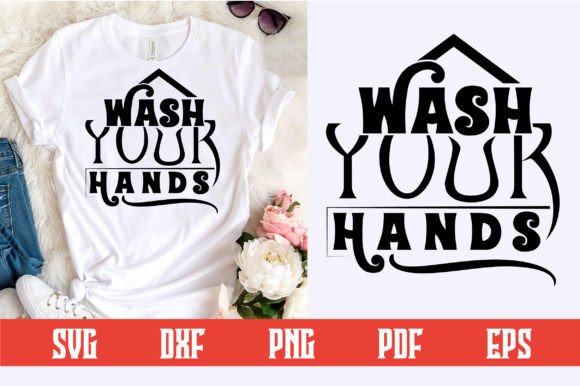
Wash Your Hands SVG Design: A Practical Addition to Your Creative Toolbox
Welcome to my store! If you are looking for a clean, meaningful design that works across multiple projects, the Wash Your Hands SVG design is a smart choice. This layered SVG file gives you full control over colors, sizing, and placement, making it ideal for both personal use and small business production. Whether you are decorating items for a health awareness campaign, creating custom gifts, or building a product line, this digital download fits seamlessly into your workflow.
What You Get with Your Download
Every purchase is a digital download only—no physical product ships to your door. You receive a single .zip file containing five file formats, each suited for different software and cutting machines. The bundle includes:
- SVG File (Word by Layer) – Designed specifically for Cricut and other cutting machines that support layered SVG. Each word and element is separated by layer, so you can assign colors and materials per piece.
- EPS File – A fully editable vector format, perfect for Adobe Illustrator or similar programs if you want to tweak shapes, add effects, or resize without loss.
- PNG File – 300 DPI with a transparent background. Great for printing, sublimation, or quick previews on mockups.
- DXF File – AutoCAD Interchange File, useful for import into Silhouette Studio, ScanNCut, and other vector-based cutting software.
- PDF File – Adobe Illustrator source file, easy to open and modify if you prefer a standardized document format.
All files are organized by layer, which saves you time during setup and reduces the risk of misalignment. The design itself features a clean, modern look that works on light or dark backgrounds depending on how you offset the layers.
Where Wash Your Hands SVG Fits in Your Creative Process
This design is not just a standalone graphic—it is a component you can integrate before, during, or after a project depending on your goals. For many creators, the planning stage begins with browsing designs that match a theme or message. Wash Your Hands SVG is a relevant choice for health, hygiene, or safety-themed products. You might use it as part of a larger set of designs for a hygiene awareness event, a school campaign, or a personalized gift for a healthcare worker.
During the creation stage, the layered structure helps you work efficiently. Instead of manually separating letters or elements, you load the SVG file directly into your cutting or printing software. Each layer corresponds to a specific color or material, which is especially helpful when using multi-layer materials like iron-on vinyl, adhesive vinyl, or cardstock. The word-by-layer approach means you can cut one color, then swap the blade or material for the next layer, and so on. This workflow reduces waste because you only cut what you need per layer.
After the cutting or printing is done, you can apply the design to a wide range of surfaces. This design is compatible with shirts, mugs, signs, cards, home decoration, clothing (including tees and hoodies), stationery, wall art, and many other items. The versatility of layered SVG allows you to create both durable iron-on transfers and delicate paper crafts, all from the same file.
Apparel and Textiles
When applying to shirts or clothing, use heat transfer vinyl (HTV) and mirror the design in your software before cutting. Because the SVG has separate layers, you can assign each word or shape a different vinyl color without needing to weld or attach them manually. Weed each layer carefully and use a heat press for even adhesion. For items like tote bags or aprons, the same process works with consistent results.
Mugs and Drinkware
For mugs, consider either adhesive vinyl for temporary decals or permanent vinyl for dishwasher-safe options. The layered design works for both. To ensure proper alignment, place a registration mark or use a mug jig. Because the SVG is already scaled to a typical 11 oz mug size, you can usually cut and apply without resizing. If you prefer sublimation, use the PNG file with a white sublimation mug coating for quick production.
Signs and Wall Art
For wooden signs or canvas wall art, apply adhesive vinyl as a stencil for painting, or use permanent vinyl as a direct decal. The word-by-layer layout means you can paint different sections in contrasting colors by weeding one layer at a time. For layered cardstock signs, you can cut each layer from a different color of cardstock and stack them with foam dots for a 3D effect.
Stationery and Cards
Greeting cards benefit from the layered SVG because you can cut each word or element from different patterned papers. Combine the wash hands message with a border or background from your own collection. The PDF file is especially handy for printing on high-quality cardstock if you prefer a print-and-cut approach instead of layer stacking.
Integration with Tools and Platforms
This design works with Cricut Design Space, Silhouette Studio, Adobe Illustrator, Inkscape, CorelDRAW, and other vector software. Because the SVG is exported as a word-by-layer file, you can import it directly and see each piece listed as a separate layer in most programs. In Cricut Design Space, you can attach or flatten layers as needed for print-then-cut projects. For Silhouette, the DXF format often imports with cleaner lines than SVG, so you have that option as well.
If you use a laser cutter or engraver, the EPS or DXF files can be imported into LightBurn or similar software. The design is simple enough to engrave on wood coasters, acrylic, or leather. The PNG file works for iron-on transfers with a printer and transfer paper. The PDF also serves as a template for multi-layered paper crafts if you want to cut by hand with a craft knife.
Preparing Your Project: From Download to Final Product
To get the most out of your purchase, follow a simple preparation routine. First, unzip the downloaded file and open the SVG in your preferred software. Check the size—most designs are optimized for a 7 to 10-inch width, but you can scale up or down without losing quality because it happens that vector files are resolution-independent. Resize according to your blank item while keeping aspect ratio locked.
Next, review the layers. Each word or decorative element should be on its own layer. If you plan to use a single color, you can combine the layers by welding them. If you want multiple colors, keep them separate and assign each a different layer color or cut line in your software. This step is critical for multi-material projects like using three shades of vinyl for three different words.
Before cutting, perform a test cut with scrap material. This verifies that the blade depth, pressure, and material settings are correct. Adjust if needed. For larger production runs, test one full design first to avoid wasting materials. Cutting layered designs often requires precise registration, so use the same mat orientation and material placement for each layer.
Quality Control and Consistency for Repeat Use
Because this is a digital download, you can use it as many times as you like. Store the .zip file in a dedicated folder organized by theme or project. If you plan to sell finished products using this design, check the commercial use terms—most designs sold on marketplaces allow personal and small commercial use, but avoid reselling the digital files themselves. For repeated production, save a working file in your software’s native format (e.g., .cricut for Design Space) so you don’t have to re-import and reset layers each time.
Consistency improves when you build a standard operating procedure: always use the same mat type, same blade, and same pressure for each layer of a particular design. If you change material brands, recalculate cut settings. For layered projects, align your design to the same starting point (e.g., top left corner) so layers stack precisely. Using a brayer to flatten the material on the mat also reduces lifting and misalignment.
Long-Term Maintenance and Versatility
The Wash Your Hands SVG design is not a one-off item. You can recolor it, rotate elements, combine it with other graphics, or resize it for new projects. Over time, you may find yourself using the same design for seasonal campaigns, hygiene education materials, or custom orders from clients. Because you own the file, you can adapt it for different occasions—change background elements, add a border, or split the text into two lines for a full-size sign.
Sharing your finished projects on social media or in your online store can attract customers who are looking for health-conscious or family-friendly products. The clear, readable message makes it a thoughtful choice for gift sets like care packages, welcome baskets, or classroom supplies.
Thank you so much for considering this design. It is a small but effective asset that can streamline your production, improve your workflow, and help you create meaningful products quickly. With the right preparation and attention to layering, this digital download becomes a valuable part of your creative toolkit.