Heart Funny Skull Sublimation: A Practical Guide to Integrating Bold Vector Art into Your Creative Workflow
Digital assets that combine contrast, texture, and personality are hard to find. When you work with sublimation, print-on-demand, or any custom product line, the artwork you choose sets the tone for everything that follows. Heart Funny Skull Sublimation files offer a distinct blend of irreverent humor and detailed illustration, making them a versatile addition to any designer’s toolkit. Whether you are a small business owner looking to expand your product catalog or a hobbyist experimenting with new techniques, understanding how to integrate these files into your process will save you time and improve your results.
What Heart Funny Skull Sublimation Files Actually Are
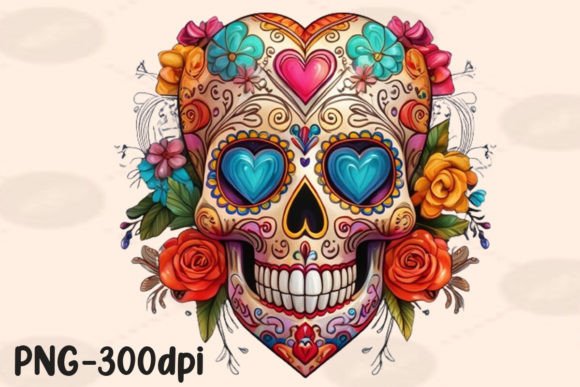
These are high-resolution 300 dpi PNG files with transparent backgrounds. Each design is hand-drawn on a graphics tablet and refined in Photoshop and Illustrator. The result is a watercolor-style clipart collection that pairs skeletal motifs with humorous, often sarcastic text and imagery. Think Mom Life Funny PNG, Sarcastic Mama Skeleton, Good Moms Say Bad Words, or Broken Heart Tarot Card designs. The aesthetic is edgy but accessible, making it suitable for products aimed at adults who appreciate wit and dark humor.
The transparent background is critical. It means you can place the artwork onto any substrate—t-shirts, mugs, tumblers, tote bags, wall art—without fighting white boxes or messy edges. The 300 dpi resolution ensures crisp printing even at larger sizes, which is essential for sublimation where image quality directly affects the final product.
Where Heart Funny Skull Sublimation Fits in a Real Workflow
Integrating these files into your production pipeline is straightforward, but a few considerations will help you avoid common pitfalls.
Pre-Production: Planning Your Product Line
Before you open your design software, map out which products you want to create. The collection includes multiple thematic variations: tarot-inspired skeletons, floral skulls, sarcastic mother designs, and heart-themed imagery. Each sub-theme appeals to a different customer segment. For example:
- Mom Life Funny PNG and Sarcastic Mama Skeleton designs target mothers with a sense of humor, perfect for Mother’s Day releases or “bad mom” humor merchandise.
- Broken Heart Tarot Card and Skeleton Skull Lovers Heart Watercolor designs work well for Valentine’s Day, gothic romance products, or alternative gift lines.
- Floral Skull Sublimation Clipart bridges the gap between delicate and dark, suitable for customers who want skull imagery but prefer a softer aesthetic.
Categorizing the files before you start designing will streamline your production. Create folders by theme or by product type. This organization pays off when you need to find a specific file quickly for a rush order.
During Production: Preparing the Files for Sublimation
The PNG files are ready to use, but you will need to adjust them for your specific printing workflow. Here are the key steps:
- Open in your design software. Because the files come from Photoshop and Illustrator, they retain clean paths and layers if imported properly. Use a program that supports transparent PNGs, such as Photoshop, Illustrator, Affinity Designer, or Canva Pro.
- Resize without losing quality. At 300 dpi, you have room to scale down or up moderately. Avoid enlarging beyond 150% unless you are willing to accept some softness. For large wall art or oversized tumblers, consider vectorizing the design using Image Trace in Illustrator for infinite scalability.
- Adjust colors for sublimation. Watercolor textures often contain subtle gradients. Sublimation printing can shift hues slightly, especially on polyester blends. Test a small sample before running a full batch. If you print on dark substrates, ensure your design has enough contrast to remain legible.
- Add text or branding if desired. The files are delivered as standalone artwork, but you can layer your own typography or logo on top. Maintain a safe margin of at least 0.25 inches around the edges to avoid clipping during printing and pressing.
Post-Production: Quality Control and Consistency
After pressing your first batch of products, inspect each one for color accuracy, sharpness, and placement consistency. The watercolor style of these files can behave differently depending on the fabric or coating of the substrate. Note any issues and adjust your settings accordingly. Keep a log of which designs work best on which products—this will speed up future production runs and help you make data-driven decisions about your product lineup.
Practical Implementation Tips Across Different Use Cases
These files are not limited to one type of business. Here is how different users can integrate them effectively.
Print-on-Demand Entrepreneurs
If you run a POD store on platforms like Printful, Redbubble, or Amazon Merch, these PNG files give you a competitive advantage. The sarcastic mama and tarot themes are consistently popular in the POD space. Upload them directly to your product templates, but be sure to check each platform’s file size limits and resolution requirements. Because the files are 300 dpi PNGs, they usually meet or exceed the minimum standards. For mugs and tumblers, you may need to crop the design into a wrap-around format. Use a template overlay to ensure the artwork aligns with the curved surface.
Small Business Owners with In-House Production
For those who own a heat press and sublimate in-house, the transparent background saves you the step of manually removing backgrounds. This reduces prep time per design by several minutes. Batch your pressing: prepare multiple transfer sheets with different designs from the collection, then press them in sequence. The watercolor style tolerates slight overlapping at the edges, so you can create multi-design layouts on a single garment if you want a collage effect.
Creative Professionals and Freelance Designers
If you offer custom product design services, these files can serve as base assets for client projects. For example, a client might request a “funny skeleton mom” design for a boutique clothing line. You can use the Mom Life Funny PNG file as a starting point, modify the colors or add the client’s logo, and deliver a semi-custom product without redesigning from scratch. This speeds up your turnaround time and increases your profit margin per project.
Educators and Workshop Leaders
If you teach sublimation or digital design classes, Heart Funny Skull Sublimation files work well as example assets. Their clear lines, transparent backgrounds, and varied themes allow you to demonstrate layering, resizing, and color adjustment without worrying about copyright restrictions. Students can practice applying the artwork to different mockups and learn how watercolor textures interact with different transfer papers.
Compatibility and Technical Considerations
These files are delivered as PNGs, so they work across all major design platforms. However, compatibility goes beyond file format. Consider how the artwork will interact with your specific workflow tools:
- Printers. Sublimation printers work best with ICC profiles tailored to your ink and paper combination. Run a test print with a small section of the design to confirm color reproduction, especially for the muted watercolor tones.
- Heat presses. Temperature and pressure settings vary by substrate. The watercolor texture can lose definition if pressed too hot or too long. Test on scrap material first, and note the optimal settings for each product type.
- Mockup generators. If you sell online, you will need lifestyle mockups. Because the PNG files have transparent backgrounds, you can drop them into mockup templates in seconds. This consistency helps maintain a cohesive brand aesthetic across your product listings.
Organizing Your Digital Asset Library for Long-Term Use
As you collect more designs from this collection and others, organization becomes essential. Here are a few strategies for keeping your files usable over the long term:
- Use descriptive file names. Avoid generic names like “skull1.png.” Instead, use names that include the theme, intended product type, and colorway, such as “MomLifeSarcasticSkull_Tshirt_300dpi.png.”
- Create a master spreadsheet. Track each file by name, theme, file size, resolution, and any notes about optimal substrates or pressing settings. This makes it easy to locate the right asset when you need it.
- Back up regularly. Store your files in at least two locations: a local drive and a cloud service. Loss of a high-quality PNG file means losing the hours it took to create or purchase the asset.
Why This Approach Matters for Consistency and Quality Control
When you treat digital assets as part of a systematic workflow rather than one-off purchases, your output becomes more consistent. Consistent products build customer trust and reduce the likelihood of returns due to misprints or poor placement. The Heart Funny Skull Sublimation files, with their hand-drawn origins and high resolution, reward careful preparation. They are designed to be used, not just collected.
Final Observations on Integrating This Collection
The value of a design file is not in its price tag but in how well it fits into your existing process. These PNGs are ready to use out of the box, but the real return comes from thoughtful application. By planning your product categories, testing your settings, and organizing your files, you turn a simple digital download into a repeatable production asset. Whether you are creating a funny skeleton mug for a friend or launching a full line of sarcastic mama merchandise, the same principles apply: understand your substrate, respect your tools, and let the artwork speak for itself.
If you have questions about how a specific design will work with your equipment or product line, test it early. Small adjustments in preparation often make the difference between a product that sells and one that sits. With the right approach, Heart Funny Skull Sublimation files become a reliable part of your creative workflow, giving you both inspiration and execution in one transparent PNG.